AirTags vs name labels
AirTags for kids: what they do, and what they don't
An AirTag finds a backpack. It cannot find a parent. Here is what one actually does, what it is genuinely good at, and how it compares with a QR name label.
Author: Muarij Kerio · Reviewed 16 September 2026
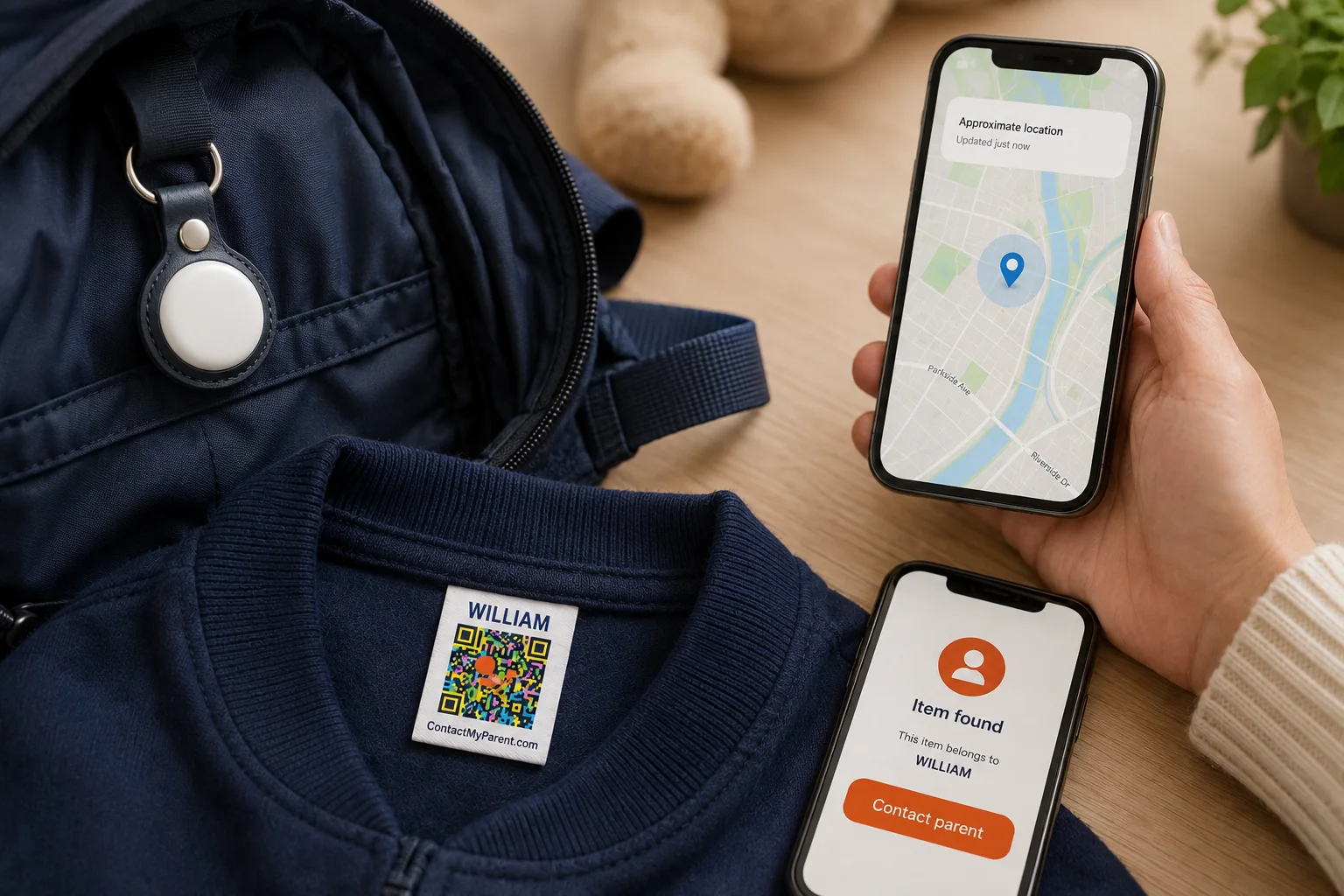
Why parents put AirTags on their kids
Nobody buys one after reading a review. They buy one after a busy afternoon, thinking about the week ahead.
The scenarios parents have in mind are ordinary ones:
- A child who drifts two aisles over while you are reading a label
- A backpack left on the bus, or under a table at soft play
- A theme park where everyone is dressed the same and walking the same way
- A school trip, or a day out somewhere none of you have been before
- A sleepover at a house you have not visited
- A birthday party in a park with three exits
None of these are disasters. They are the everyday moments where knowing would be nice, and an AirTag looks like the cheapest way to know.
It is the obvious answer for five good reasons:
- It is $29 and there is no subscription. A kids' GPS watch is hardware plus a monthly bill, forever.
- You already own the other half. Find My is on your phone. There is no new app, no new account, no setup evening.
- It is invisible. No screen, no notifications, nothing for a seven year old to play with or lose interest in.
- You do not have to charge it. A year on one coin cell, which is roughly a year longer than any watch.
- You have already seen it work. It found your keys. It found the suitcase. The leap to your child feels small.
Every one of those is a fair reason to own an AirTag. They are reasons to buy the device. They are not evidence it does the job you are picturing, and the distance between the two is what the rest of this page is about.
AirTags are not GPS
This is the single most useful thing to understand about them, and it is the thing almost every product page leaves out. There is no GPS chip inside an AirTag, and no SIM or cellular connection either. It cannot work out where it is. It has no way of telling anybody.
What it does is broadcast a Bluetooth signal, which Apple describes as being “detected by nearby devices in the Find My network,” and those devices relay the position to iCloud so you can see it on a map. (Apple, AirTag)
In other words, an AirTag does not know where your child is. Strangers' iPhones do, and they pass the message along. Three things follow from that, and they explain every limitation further down this page.
- You see where the tag was, not where it is. If no Apple device has walked past it in twenty minutes, you are looking at a twenty minute old position.
- It is superb in a crowd and useless in a quiet place. A shopping mall is thick with iPhones. A country lane, a park at dusk or a residential street at 9pm is not.
- It is not a live tracker. Watching a dot move across a map in real time is not what this device does, at any price.
Most parents are picturing a car satnav. What they are buying is a trail of breadcrumbs left by passing strangers.
AirTags for kids: the pros and cons
The left column is genuinely good, and it is why the device sells.
What an AirTag is genuinely good at
- Finds the bag left on the bus, in the taxi or at a friend's house
- Excellent in crowds: malls, airports, city centres, stations
- $29 once, no subscription, and the battery runs over a year
- Uses the Find My app already on your phone, nothing new to learn
- Rated IP67, so rain and a dropped water bottle are not a problem
Where it falls short on a child
- No GPS inside it, so no live map and no moving dot
- Announces itself to the adults around your child, then starts beeping
- Setup needs an Apple device, so Android families are out entirely
- $29 per item, which is why almost nobody tags more than one bag
- Cannot go on clothing, and clothing is what's inseparable from the child
- Gives the person holding your child nothing they can act on quickly
Read the right-hand column again and notice what it has in common. Almost every item is about other people: the adult whose phone raises the alert, the Android parent who cannot set one up at all, the adult standing with your child and holding nothing useful. An AirTag is a private conversation between you and an object. Every lost-child story ends with a stranger.
An AirTag tracks the bag, not the child
On a forum thread about putting AirTags in school backpacks, one reply answered the entire question in six words: you are really just tracking their bag.
That is the assumption sitting underneath every tracker setup, and it is worth saying out loud, because a child and their backpack spend most of the day apart.
- The bag is on a peg in the cloakroom. The child is out in the playground.
- The bag is on the coach. The class is walking round the museum.
- The bag stays in the classroom. The child is taken to the school office.
- The bag is in the hotel room. The child is at the pool.
Nine times out of ten that does not matter, because nine times out of ten you are looking for the bag. The tenth time is the one you bought the tag for, and it is exactly the moment the two have come apart.
Clothing cannot come apart from a child. That is the entire reason a name label belongs on a collar rather than on a keyring.
What a QR name label does instead
A ContactMyParent label is an iron-on label for clothes or a waterproof sticker for bottles, bags and lunchboxes, printed with your child's name and a QR code.
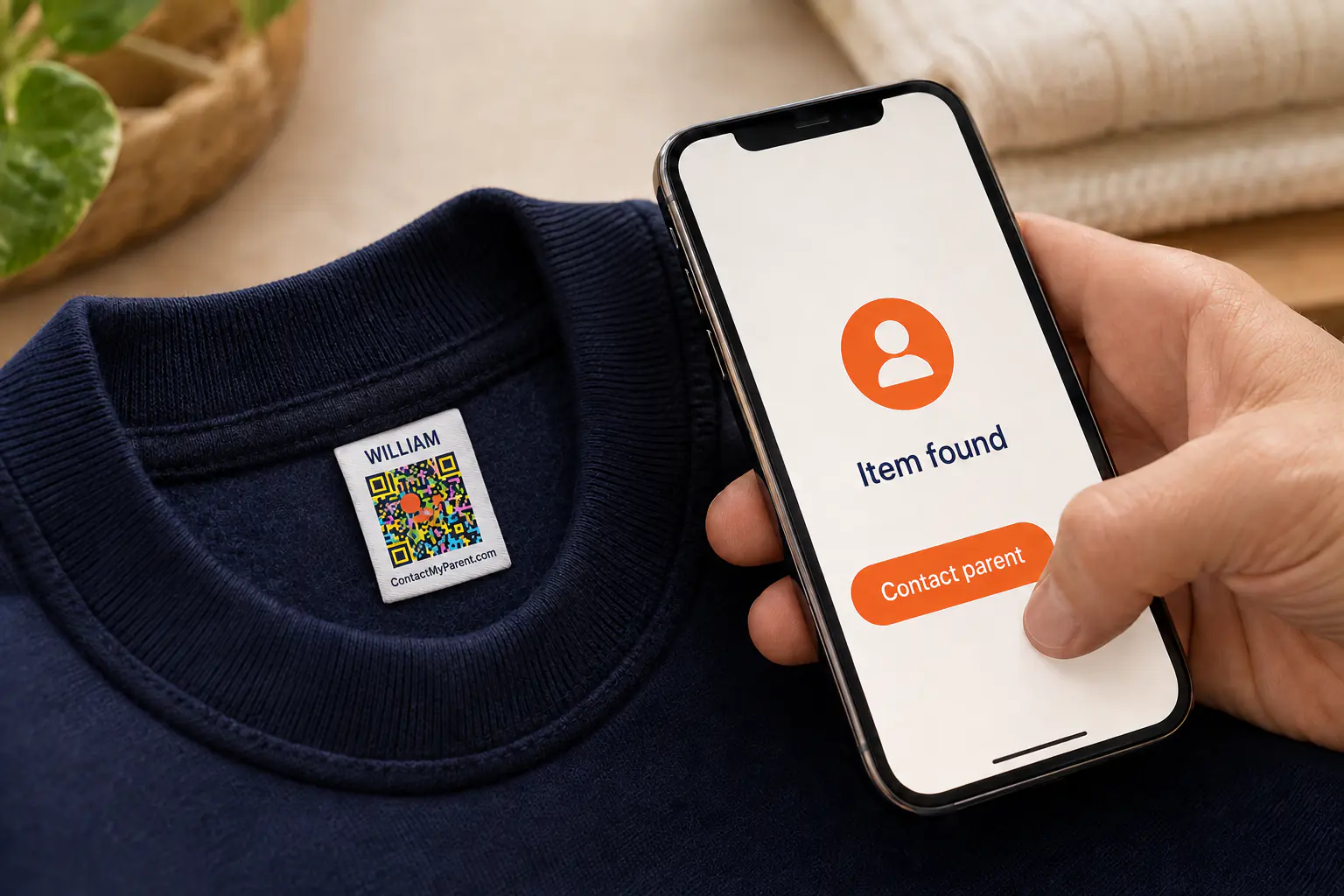
- Anyone can use it. Any phone camera, iPhone or Android, five seconds, nothing to install.
- You stay in control of your number. Show your contact details, or switch to a message form that reaches you while keeping your number private.
- It carries the things a location cannot. Name, alternate contact, and an optional note of up to 500 characters for allergies, medication or care needs.
- Change your phone and nothing breaks. The code points at your account, not at a number printed on fabric.
- It has no battery to die and no signal to lose. It works in a field, on a plane and in a car park with one bar.
What it will never do is show you a map. That is a tracker's job.
Labelling for one setting in particular? There are pages for name labels for school, daycare labels and camp labels, each with a list of what to label first.
One-time purchase, no subscription, 30-day returns.
But can't anyone scan a QR code on a child?
It is the first thing parents ask, and it should be. Here is the honest mechanics of it.
What is printed on the label is a first name and a code. No phone number, no address, no school, nothing a stranger can read off your child's collar from across a room. That is already safer than the traditional answer, which was writing your mobile number onto a sewn-in tape where anybody could copy it down.
The code does not hold your details either. It points at a page you control, and you decide what a finder sees:
Details visible
The finder sees your name and number and can call you in one tap. This is what most parents switch on for a day out, a flight or a theme park.
Private
The finder sees a message form and nothing else. They can still reach you in seconds. They cannot see your number, your address, or anything you have written about your child.
You move between the two from your phone, as often as you like. Private on the school run, visible at the airport, if that is how you want to run it. That switch is the whole answer to the question, and it is the thing a printed number can never do: once a number is on the fabric, it is on the fabric for the life of the garment.
AirTag vs QR name label, point by point
Nine comparisons, on the things that actually decide how a lost afternoon ends.
| Feature | AirTag | QR name label |
|---|---|---|
| What it is built for | Finding an object you own | Helping a stranger return your child |
| Cost to cover ten items | About $256, buying four packs and singles | $14, or print your own for nothing |
| Goes on clothing | No. It is a 32mm disc that needs a holder and a strap | Yes. Iron-on for garments, stickers for hard items |
| Can a finder reach you | Only in Lost Mode, if they spot it, own an NFC phone and think to tap it. They then see your raw number | Any phone camera, in about five seconds. You choose your number or a private message form |
| Welcome at school and daycare | Contested. It alerts staff phones all day, and many schools treat personal trackers as a privacy problem | Expected. Most schools and nurseries ask you to label everything your child brings |
| Carries allergies and care notes | No. It carries a location and nothing else | Yes. Up to 500 characters, shown to the finder when you choose to show your details |
| Needs power and signal | A battery, Bluetooth, and a passing iPhone | Nothing at all |
| Works if you use Android | No | Yes |
| Where it goes quiet | Quiet streets, rural areas, anywhere without iPhone traffic, and the moment somebody removes it | It will never show you a map. That is the tracker's job |
AirTag prices from Apple's store, checked 16 September 2026. Label prices are our own.
1. School and daycare
Ask your school before term starts rather than after a confiscation. Policies vary enormously and a great many schools have nothing in writing, which means the answer arrives when somebody objects.
The friction is built in. A backpack sits a metre from a teacher's phone for six hours a day, and the unwanted-tracking alert is designed to fire in exactly that situation. Some schools also take the view that a personal tracker cuts across their own safeguarding procedures, which is a conversation you probably do not want to be having in week two.
A name label creates none of that. Schools and nurseries already ask you to label everything. You are doing the thing they requested, and the QR code is the part that turns a name into a phone call.
2. What it costs to cover a whole childhood
One AirTag is cheap. Covering a child is not, because children do not lose one thing.
Count what actually travels: school bag, PE kit, coat, water bottle, lunchbox, swim bag, the comfort toy, the tablet case, the scooter helmet. Call it ten items. Ten AirTags costs about $256 in four packs and singles, and you still cannot attach one to the coat. Ten iron-on labels costs $14, or nothing at all if you print your own for the bags and bottles first.
That is about $25 an item against about $1.40 an item. It is why almost every parent who buys an AirTag tags exactly one bag, and why the other nine things go out of the house every morning with nothing on them.
3. Can the finder actually reach you?
This is the question the whole category avoids, and it is the only one that matters once your child is standing with somebody else.
Apple did build a path. Turn on Lost Mode and a finder can tap the tag with an NFC phone to see contact details you entered. Now picture using it. The finder has to notice a small white disc buried in a bag, own a phone with NFC, know that tapping a piece of plastic does anything at all, and think of all three while holding a crying six year old. Whatever number you typed in is the number they see, with no privacy setting.
The label version: they read the name on the collar, point the camera, and they are talking to you. Everyone alive knows what a QR code is. That is not a small advantage, it is the entire difference between a tracker and a reunion.
4. Where an AirTag goes quiet
An AirTag is only as good as the iPhones around it, so it dims exactly where you would most want it bright: a rural footpath, a campsite, a beach out of season, a village, a quiet street after dark. Fewer phones, fewer updates, older position.
It also goes quiet in four ordinary ways. The battery finally dies. Your child leaves the tagged bag in the classroom and walks out with their coat. An adult sees the alert and removes it. Or you use an Android phone, in which case you could never set it up in the first place.
A label on a sleeve has no state. It is not on or off, charged or flat, in range or out. It is just there, on the thing your child is wearing, in a field with no signal at all.
5. Allergies and medical notes
A tracker carries a location. That is the whole payload. It cannot tell anybody that your daughter is anaphylactic to peanuts, that your son is autistic and nonverbal and will not answer questions, or that the inhaler is in the front pocket.
A ContactMyParent profile carries an optional note of up to 500 characters alongside your contact details, shown to a finder whenever you have your details switched on. For families managing an allergy, a seizure condition or a child who does not speak to strangers, this is usually the reason they came looking, and no tracker on the market addresses it.
If you would rather share nothing until you have spoken to the person, switch to private mode and the finder sees only the message form.
6. How do you actually attach one?
Nothing in the box answers this, and it is a real decision. We compare all seven in the guide to AirTag holders for kids. The usual options are:
- A silicone wristband or bracelet
- A pouch laced into a shoe
- A clip-on case on a backpack zip
- A Velcro or zipped pocket sewn inside clothing
- A lanyard or a necklace
Read that as a security problem rather than a shopping list. Every option on it is designed to come off, which means it can also come off by accident: travel guides that recommend AirTags for children list losing the AirTag itself among the drawbacks. Cords and lanyards round a young child's neck carry their own risk, and a good many nurseries will not allow them at all. A holder is also another purchase on top of the $29, per child, per item.
A name label sidesteps all of it. An iron-on goes into the garment once and stays there through the wash. A sticker goes on the bottle and stays on the bottle. Nothing to clip on, nothing to thread, nothing to leave behind in a hotel room.
Apple updates Find My regularly and has shipped a second-generation AirTag with a louder speaker and longer Precision Finding range. The behaviour and prices on this page are as Apple published them in September 2026, including the cross-platform alerts announced with Google in May 2024.
Abroad, and the language problem
Travel is where parents reach for a tracker hardest: airports, theme parks, cruise ships, a city none of you can navigate. It is also where the standard advice is to buy several tags per child, which is a quiet admission that one is not enough.
Two things change when you leave home, and both of them work against the tracker.
Your phone changes. Roaming switched off, patchy data, a local SIM, and a battery that is flat by four in the afternoon. Find My is no use at all unless you are online.
The finder changes. At home, whoever picks up your child probably speaks your language and can read a name sewn into a coat. In Lisbon, Dubai or Tokyo they may not, and a phone number on a label is a number they cannot explain to anyone or dial with any confidence.
A QR code does not have that problem. It is the same gesture in every country on earth: point the camera, tap the link, and they are holding a way to reach you, without needing to read or pronounce a single word first.
So which one should you buy?
If you are only going to do one thing, put your contact details on the things that travel.
Not because it is clever, but because it is the only layer that works in the situation everybody is actually picturing. A tracker shortens your search. A label ends their confusion, and almost every lost child is found by a person long before they are found by a parent with a phone. The shop assistant, the lifeguard, the teacher on the gate, the mum by the carousel: none of them have your Find My app, and all of them have a camera.
It also happens to be the cheaper, simpler, more durable layer, the one the school already asked you for, and the one that keeps working when the battery is flat and the signal is gone.
Better together: how to layer them
This was never really an either-or. An AirTag and a name label answer different questions, and the families with the best setup run both. In this order:
- Teach the script first. A child who can say their full name and a parent's phone number beats any device ever made. Practise it in the car. It costs nothing.
- Label everything that leaves the house. Coats, jumpers, PE kit, bottles, bags, lunchboxes. This is your base layer: cheapest, no battery, works with any finder.
- Add an AirTag to the one or two bags that travel furthest. The school bag, the holiday backpack. Let it do what it is genuinely good at, which is helping you find an object in a crowded place.
- Add a GPS watch only if you want live location, and check the school's device policy before you buy. That is the product that does the moving-dot-on-a-map thing, and an AirTag never will.
- Turn on Lost Mode if you do use a tag, and tell the adults around your child that their phones may flag it, so nobody panics and bins it.
No product stops a child getting lost. The goal is to shorten the gap between lost and found, and that gap closes fastest when the person who has your child can reach you without asking anyone's permission.
Questions parents ask
Can I put an AirTag on my kid?
Yes, and plenty of parents do. Apple built AirTag to locate belongings rather than people, and it has no GPS of its own. The practical limits are the ones to plan around: no live location, an alert on the phone of whichever adult your child is with, and nothing useful for the person who actually finds your child.
Can AirTags be used for tracking children?
They can be carried by a child, but they do not track in the way the word suggests. An AirTag has no GPS and no cellular connection, so it reports a position only when somebody else's Apple device passes close enough to relay one. You get a trail of past locations rather than live movement, and only where other iPhones are about. Apple sells AirTag as an item tracker and does not present it as a way to track people.
Are AirTags safe on children?
Use a proper holder so the coin-cell battery stays inaccessible. The larger issue is that AirTag is designed to be discovered. Since May 2024, iPhones on iOS 17.5 and Android phones on Android 6.0 and later both alert anyone an unknown tag travels with, and the tag eventually plays a sound, so teachers and caregivers can find it and take it out.
What is better than an AirTag for kids?
For live location, a GPS watch or kids' phone does what most parents imagine an AirTag does. For the moment that actually matters, when someone has found your child and wants to help, a QR name label on the clothing beats every tracker, because the finder needs only a phone camera and gets a way to reach you straight away.
What is the best tracker for kids?
The best setup is layered rather than single. Label the clothes and bags so any finder can reach you, teach your child to say your phone number, and add a tracker on top if you want to shorten your own search. Compare purpose-built GPS watches on cellular connection, battery life and emergency contacts. AirTag is an item tracker, and Apple does not market it as a child-safety device.
Will my child's school allow an AirTag in their bag?
Ask before term starts rather than after a confiscation. Policies vary widely and many schools have none in writing. The practical friction is that a bag sitting near a teacher's phone all day can trigger unwanted-tracking alerts and set the tag beeping. Name labels raise none of this, and most schools ask for them anyway.
Can a stranger who finds my child use the AirTag to reach me?
Only if you have turned on Lost Mode, the finder notices the tag, owns an NFC-capable phone and thinks to tap it against the disc. They then see whatever contact details you entered, with no way for you to keep your number private. A QR label on the collar needs a camera and a glance.
Where should I attach an AirTag on a toddler?
The usual answers are a silicone wristband, a pouch laced into a shoe, a clip on a backpack zip, or a pocket sewn inside clothing. Weigh each one for whether a toddler can get it off, since anything reachable will eventually be pulled off and posted somewhere interesting. Avoid lanyards and neck cords on small children, and check your nursery's rules, because many do not allow them.
Will my child's AirTag show up on other people's phones?
Yes, and that is deliberate. A tag away from its owner's phone is treated as an unknown tracker, so the adults spending the day with your child can be alerted on iPhone or Android, and the tag itself chirps when it is moved after a while. Hiding it does not prevent this. It is worth telling teachers and caregivers in advance so nobody assumes the worst and removes it.
Are AirTags any good for tracking kids in busy places?
This is where they are at their best. Malls, airports, stations and theme parks are thick with iPhones, so positions refresh often and stay reasonably current. The catch is that a crowded venue is also where a child is most likely to be found by a stranger within minutes, and at that moment the tag is talking to you rather than to the person standing with your child.
What should I use for a 3 year old, a 6 year old and a 9 year old?
At three, contact details on clothing and bags do nearly all the work, because the child cannot reliably give a phone number. At six, keep the labels and start practising the number out loud. At nine, if you want live location for the walk home, that is the point to consider a GPS watch or kids' phone and to check the school's device policy first. Labels stay useful at every age, because kit still goes missing at fourteen.
Label the things that travel
Ten iron-on labels cost $14, half the price of a single AirTag, and cover ten times as many things. Any phone camera, no app, no battery, no subscription.